
Agents pick more often than they write. Which tool comes next, whether the result is enough, whether to retry, whether to hand to a human. Dozens of small decisions in a row decide speed and cost.
This post covers the three most practical slots for moving those decisions out, plus a triage design using an incident example. It puts the structure from the overview into practice.
Why move them: calling a big LLM for every small pick adds up
Take an order-error intake. Deciding whether it is a payment error or an account problem does not always need long reasoning and sentence generation. Calling a giant generative model every time stacks latency and cost as volume grows.
Before: every pick calls a frontier LLM (slow + expensive)
After: Generator + Decider + Verifier split roles
The classification step in the routing post is exactly this Decider slot. As the Strands Decider post shows, picks belong with a fast, cheap model that returns confidence.
That does not remove LLMs. Complex prose and reasoning stay with LLMs, repeated structured picks move to Decision AI. The split is the point.
Three practical slots
Overlapping Microsoft's announcement with field usage leaves three slots.
1) Routing: look at the request, pick the model and team
Pick cheap versus strong models by question type. Sending a message to billing, technical, or account is routing too.
Input: "payment retry failed 3 times, log ID …"
Decision: which team, model, and workflow?
Output: technical 0.78 + confidence
→ high confidence routes automatically, low confidence re-checks with a stronger model
This matches the promotion pattern in the Sonnet high-effort post. A small model goes first, a big model second. Only low-confidence cases pay for the expensive model.
2) Quality gates: check LLM answers against criteria
Check what an LLM wrote against defined criteria. The Copilot team measuring reply quality with Decision-1 is an example here.
LLM draft → Decision AI grades it against a rubric
  → ACCEPT (send as is)
  → REVISE (rewrite)
  → HUMAN_REVIEW (human check)
Asking the writing model to inspect itself is slow and expensive. Splitting writing from picking lets you place a gate on every request.
3) Classification: sort repeated messages by stable criteria
Sort customer messages and incident tickets by stable criteria. Xbox grouping 10,000-plus feedback items into fixed themes is the headline example.
Daily tickets:
  - payment, technical, or account
  - urgency low, medium, or high
  - auto-processable yes or no
→ bundle three questions about one request in parallel
None of the four needs text generation. Picks, scores, and yes-or-no answers are enough.
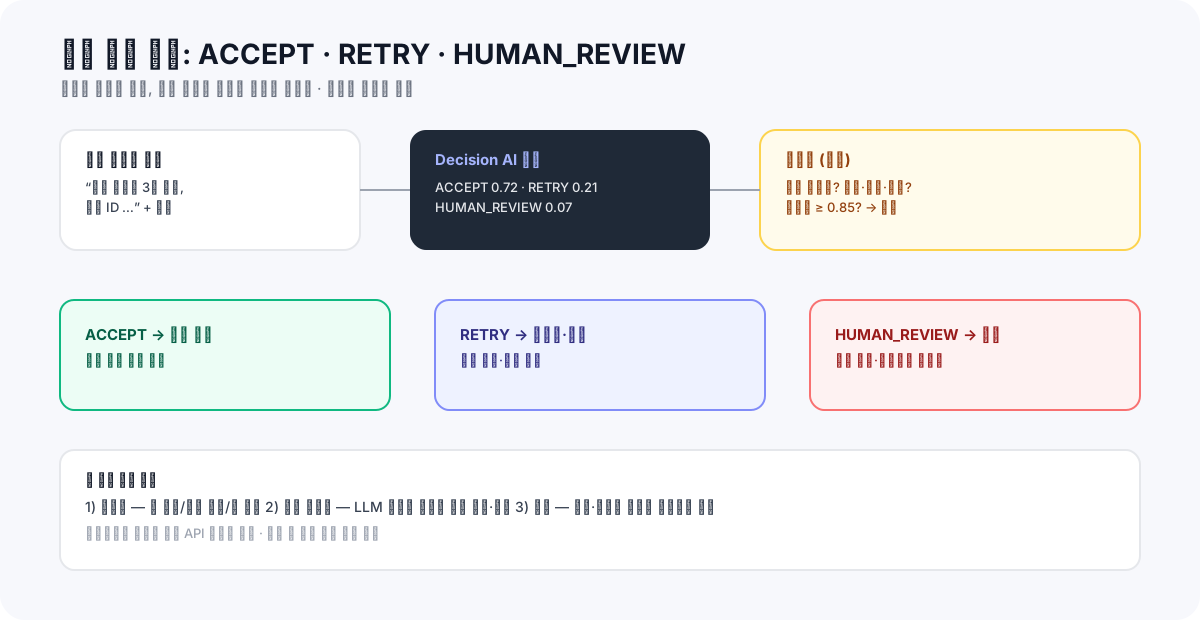
Worked example: splitting incident response into ACCEPT, RETRY, HUMAN_REVIEW
Now build a branch from an incident report. Three outcomes.
ACCEPT: go to the next step (high confidence, no risk)
RETRY: enrich info and retry (transient errors, missing context)
HUMAN_REVIEW: human review (low confidence or high risk, always)
The code below is an offline local simulation. The probabilities are illustrative, not real model output. The gate is the point, not the model: code blocks risky conditions no matter how high the score.
OPTIONS = ("ACCEPT", "RETRY", "HUMAN_REVIEW")

def select_action(probabilities, risk_flags, threshold=0.85):
    if set(probabilities) != set(OPTIONS):
        raise ValueError("option schema mismatch")
    # Risk conditions always go to a human, regardless of score
    if risk_flags & {"payment", "delete", "permission_change", "personal_data_export"}:
        return "HUMAN_REVIEW"
    selected = max(probabilities, key=probabilities.get)
    if probabilities[selected] < threshold:
        return "HUMAN_REVIEW"
    return selected

# Illustrative examples (not real model output)
print(select_action({"ACCEPT": 0.94, "RETRY": 0.03, "HUMAN_REVIEW": 0.03}, set()))  # ACCEPT
print(select_action({"ACCEPT": 0.52, "RETRY": 0.31, "HUMAN_REVIEW": 0.17}, set()))  # HUMAN_REVIEW
print(select_action({"ACCEPT": 0.99, "RETRY": 0.005, "HUMAN_REVIEW": 0.005}, {"payment"}))  # HUMAN_REVIEW
The last line is the key. Even at 99%, payment goes to a human. Model confidence and execution permission live on different layers. That principle returns in the checklist post.
Three checks before calling the real model
After simulation comes the real call. On Microsoft Foundry, confirm three things.
1. Deployment: deploy Decision-1 in your Foundry subscription, confirm model and deployment IDs
2. Auth and route: confirm the providers/microsoft/v1/systemone route and Entra auth header
3. Validation: check the returned answers object for type and option membership (handle parse failures)
The official TechCommunity Python example follows exactly this flow. It sends state and questions and reads the choice from answers to measure accuracy and latency. Keep credentials outside code and confirm region and account values. Keep local simulation and live API examples in separate files. Never present simulation output as live results.
Measure against your labeled data, not three examples. Around 100 cases is a start. Run the current method and Decision AI on the same inputs and compare match rate, latency, and cost together. Finish the branch by handling the low-confidence band (below threshold goes up).
CodeBridge Mini Lab: one branch finished this week
1. Pick 1 picking task: the most-called of routing, gating, or classification
2. Log for 2 weeks: call counts, tokens, latency, cost (current LLM baseline)
3. Run the same work through Decision AI:
   [ ] choice match rate (aim 95%+)
   [ ] latency and cost deltas
   [ ] above-path for low confidence
4. Decide: split on a match, force risk conditions in code
   (payment, delete, permission, personal data always go to HUMAN_REVIEW)
It is the same frame as the Mini Lab in the local-decisions post. Only the model and the /v1/systemone-style endpoint change.
Conclusion: split how you ask
One line to close.
What to do and how to do it are different models' jobs.
Find the most-called pick in your agent and turn logging on. Those numbers decide the next architecture. The first question is not how to write better answers, but where to place the picking work.
The criteria for splitting safely and what to measure before adoption continue in the checklist post.
Further reading
- An AI that only decides: Microsoft-Decision-1 overview
- AI now decides more than it writes: Strands Decider 2B
- Decision models become a native stack feature: LocalAI 4.11
- Implementing AI model routing directly
- Even at 99%, do not auto-execute
References
- Microsoft Foundry Blog: Introducing Microsoft-Decision-1 in Microsoft Foundry (Oct 9, 2026)
- Microsoft Command Line: Introducing Microsoft-Decision-1 (Oct 9, 2026)
- Laya Benchmarks Tracker
- sysone-bench: same-input comparison
Go deeper with a course
Once the branch design is clear, only attaching it to your work remains. The hardest practical part is deciding what stays as code rules, what goes to model judgment, and where human review enters.
The Practical Decision AI course runs Laya directly to build states and questions, then connects confidence to policy and Human Review, plus a validation frame to use before applying it to your own work. If you want to automate one repeated decision, it continues directly from this post's Mini Lab.