
Until now, the basic unit of ChatGPT was text. No matter how smart it got, the result was mostly a long answer box, and understanding and using it was up to you.
Intelligent UI in GPT-6, announced by OpenAI on October 7, 2026, changes that premise. Depending on your question, ChatGPT combines text, visuals, buttons, forms, charts, diagrams, calculators, and games into an answer that is itself a screen.
This article goes beyond "the UI got prettier" to explain why the change shakes both chatbot output formats and how software gets used.
The facts first: what, when, and for whom
Stripped to the essentials from the official announcement (OpenAI: GPT-6 and Intelligent UI for everyone):
- Launch: rolling out globally from October 7, 2026, starting in the Chat tab. Paid tiers (Plus, Pro, Business, Enterprise) first, then Free and Go tiers the next day. Enterprise availability depends on admin settings.
- Models: paid tiers use GPT-6 Sol, Free and Go tiers use GPT-6 Luna. Both are tuned for everyday conversation. This update applies to the Chat experience only. The models behind Work and Codex do not change.
- Scope: when a simple text answer is the most useful response, ChatGPT still gives you that. This is not "every answer gets flashy." It is a model that picks the right format per question.
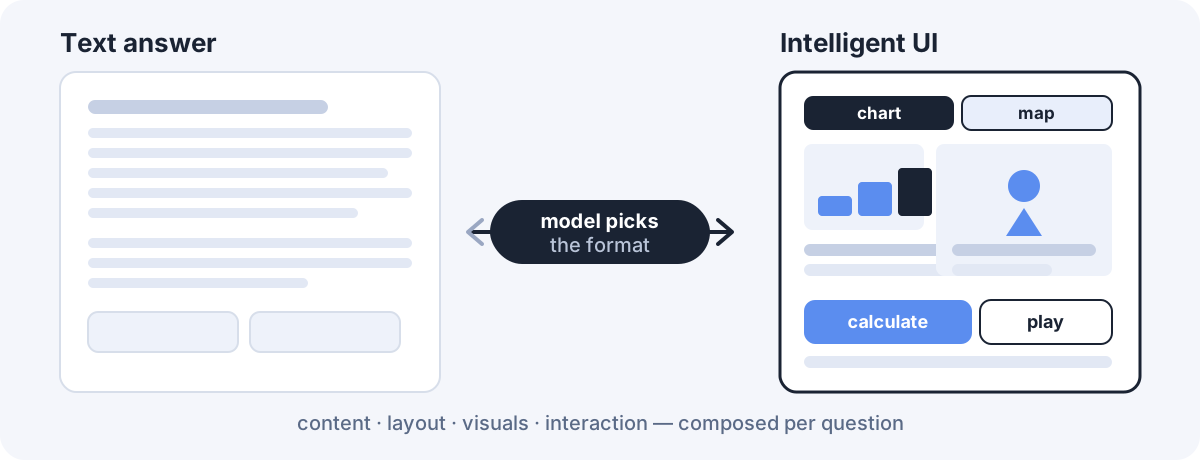
The chatbot so far: every answer had the same shape
Chatbot output used to be remarkably fixed. Ask for a recipe, a trip plan, or a statistics concept, and back came top-to-bottom prose.
Users did the rework. Scaling portions to the headcount, copying schedules by hand, turning concepts into mental pictures. Answers grew longer as models got smarter, but the interaction stayed the same.
What changes now: the model picks the format
With Intelligent UI, the model looks at your question and decides the shape of the answer.
- A comparison can become a side-by-side view.
- An explanation can become an interactive diagram you poke at while learning.
- A calculation can become a tool built on the spot instead of prose you follow.
The announcement's examples make it concrete. Ask about a Sunday lamb roast and a guest-count calculator sits next to the recipe. Ask about a road trip and stops appear on a map with notes on worthwhile detours. A wardrobe plan becomes a schedule, and a 7-speed bike teardown becomes a diagram where you tap five systems: frame, wheels, drivetrain, brakes, cockpit.
Three buckets make it easy to grasp
The launch cases fall into three groups.
1. Everyday questions, more visual. Timing next to the recipe, itinerary next to the map. Work shifts from "read then organize" to "look and decide."
2. Learn by touching. Topics you only get by changing values: the central limit theorem, GDP, drone photography, the Monty Hall problem. A screen where inputs change outputs beats paragraphs.
3. Tools created in the moment. A bill splitter for dinner with friends, a retirement savings calculator, a retro game playable right in the conversation. No need to read the answer and open another app. The question becomes the tool.
The point is component composition, not HTML generation
Here is the easiest thing for developers to misunderstand. Intelligent UI is not "the model spits out HTML."
Per OpenAI, two things sit behind it: a library of native, streamable components plus a compiler that processes the interface as the model generates it. The library gives each response a familiar design foundation, and the compiler lets the screen appear progressively without waiting for the full response.
Training follows the same direction. The model learned to judge content, layout, visuals, and interaction, and its interfaces were evaluated for clarity, usefulness, and completeness. When to use interactivity and when to stay quiet with text was itself part of training. OpenAI is upfront that the model's design judgment still needs work.
Do not confuse this with the Apps SDK from October 2025. The Apps SDK brings outside developers' apps into the conversation. Intelligent UI is the model composing the right screen itself. One is connection, the other is closer to composition.
It starts answering while still thinking
A second change shipped alongside: speed. Older reasoning models made you wait until thinking finished. GPT-6 interleaves thinking with answering. It weighs your waiting time, drafts a partial answer from knowledge and findings so far, then keeps enriching it.
Two internal-evaluation figures from the announcement:
| Item | Result |
|---|---|
| Heavy reasoning | On everyday agentic tasks, GPT-6 Extra High begins answering in the time GPT-5.6 Medium takes, while scoring better overall than GPT-5.6 Extra High |
| Fast responses | For web-search questions, GPT-6 Instant starts answering 44% sooner on average than GPT-5.6 Instant |
Both are OpenAI internal evaluations, so do not mix them with independent third-party scores. The direction is still clear: less waiting plus progressively rendered screens — both must hold for in-conversation UI to work.
Not every answer gets flashy
Match the expectations with the limits.
First, text stays the answer when text is best. The announcement says so explicitly. UI is an option, not the default.
Second, coverage centers on the Chat tab. The models behind Work and Codex do not change in this release.
Third, safety ships with it. Building on Astra's safety training, GPT-6 reportedly resists bypass attempts better, handles adaptive multi-turn attacks, and states its own limits more honestly. Full results are in the system card.
This bends product UX itself
The announcement's closing line says it all:
For decades, people have had to learn how to use software. The future will be different. Instead of people adapting to software, software will adapt to people.
Instead of users learning fixed interfaces, software reshapes itself around the goal. That this experiment starts inside ChatGPT, used by 1.2 billion people weekly, is what makes it significant. The right frame is not the tired "chatbots replace apps" prophecy. It is closer to this: conversation borrows the shell of an app whenever it needs one.
The question left for developers
Repeating the pinned-comment question here:
Will developers stay people who build UI directly, or become people who design the data, tools, and workflows that let AI build the right UI per situation?
Three near-term implications for real work:
- Output contracts change. You used to design what to say. Now you design in which format and with which interactions.
- Component and data boundaries matter. For a model to pick screens, something must define which tools run on each tap and which state persists.
- Text fallback survives. Not every answer becomes a screen, so writing answers that stand alone as text stays valuable.
A mini experiment for today
Ask the same topic two ways:
A. Explain in text only: explain the central limit theorem in plain prose.
B. Build me a tool: make something in this conversation where I can change values and see the central limit theorem.
The comparison is not "which looked cooler":
- Which took less time to understand?
- Which is easier to re-explain to someone else?
- Which made errors or fuzzy parts easier to spot?
That short comparison teaches the essence of Intelligent UI. The difference is not prettiness. It is comprehension and usability.
Conclusion: answers become UI
The real GPT-6 Intelligent UI story is not a number on a scoreboard. It is a model that builds the screen you interact with on the spot, so text answers start turning into interactive experiences.
Maybe not the end of the chatbot, but the end of chatbot output as we knew it. From here, "an AI that answers well" and "an AI that shows and lets you touch" will be judged as different skills.
Further reading
- GPT-6 Sol vs Luna: why you do not always need the expensive model
- How GPT-6 Astra changes AI usage: finishing beats answering
- AI-era web development: how far can vibe coding go?
References
- OpenAI: GPT-6 and Intelligent UI for everyone (Oct 7, 2026)
- OpenAI: GPT-6 System Card (October 2026)
- OpenAI: Introducing apps in ChatGPT and the new Apps SDK
- OpenAI Developers: Apps SDK — Design components
Go deeper with a course
If you want to plan screens with AI and connect them from implementation to deployment, building a website from scratch is the fastest way to feel how this article's ideas work in practice.