
“Ninety frames in about a second” is the line that travels. The more interesting change in raea 0.1.0 is not the speed itself. A video scene is written as a React component, rendered to MP4, played like a game, and sampled at a specific frame as a PNG that an agent can inspect. That is a different contract from a generative video tool that ends at “prompt in, clip out.”
The raea 0.1.0 release was published on 9 November 2026 at 16:11 UTC. The repository calls itself canary: it changes daily, and Windows is the newest and least tested target. This article is a review of the published documentation and repository. We did not install raea or run the rendering benchmarks.
One engine, two outputs
The basic unit is a composition. A React component draws a frame for a given moment. useCurrentFrame() reads time, interpolate() maps values, and Composition declares resolution, frame rate and duration. The README's Hello example renders a 1920×1080, 30 fps, 90-frame scene with raea render hello.tsx -o hello.mp4.
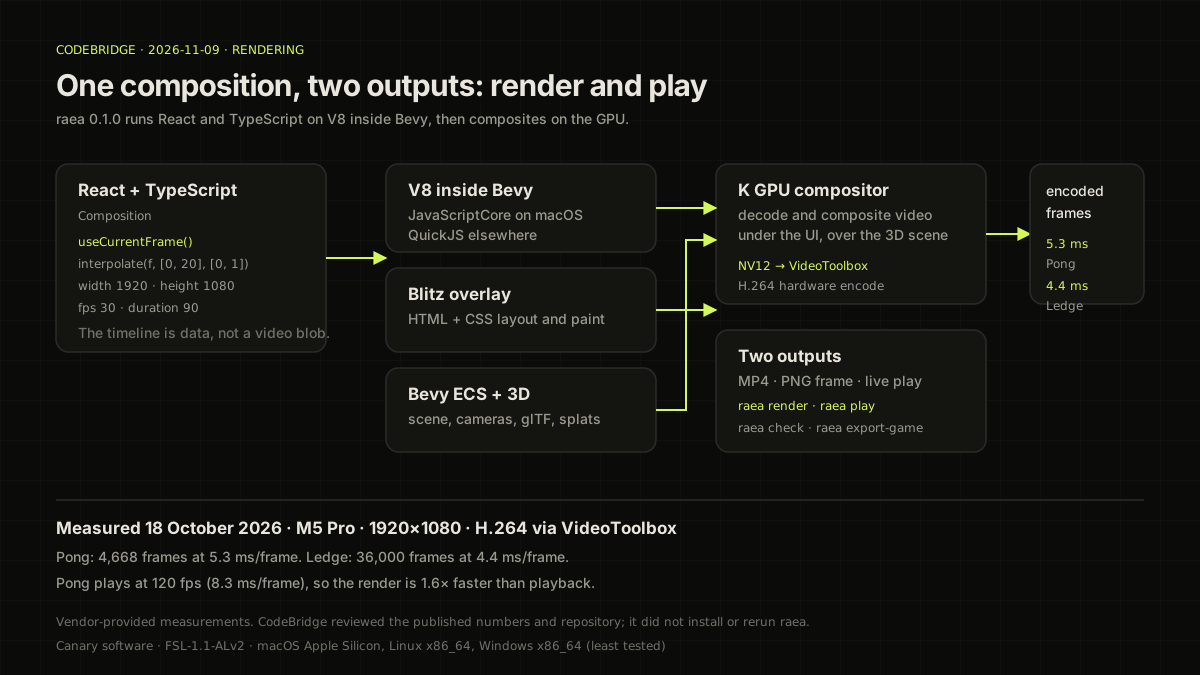
The layers are specific. The composition runs on V8: JavaScriptCore on macOS, QuickJS elsewhere. raea/ecs exposes Bevy's World. Blitz, a Rust HTML/CSS renderer, lays out and paints the interface overlay. A K kernel decodes and composites video on the GPU, under the overlay and over the 3D scene. Finished frames are converted to NV12 on the GPU and encoded by VideoToolbox.
The interesting part is that rendering and playback share the engine. raea render bakes frames offline. raea play runs the same composition like a game. A game is a composition whose state is a pure fold: useGameState(initial, step) applies step to the keys held at each frame. Live play reads the keyboard; rendering reads a recorded input log. raea's replay gate checks that both produce the same pixels at SSIM of at least 0.999 on every frame. Its game gate requires 120 fps, input on screen within two frames, and memory below 400 MB.
import { AbsoluteFill, Composition, interpolate, registerRoot, useCurrentFrame } from "raea";

function Hello() {
  const f = useCurrentFrame();
  return (
    <AbsoluteFill style={{ background: "#000", color: "#fff", fontSize: 120, opacity: interpolate(f, [0, 20], [0, 1]) }}>
      Hello
    </AbsoluteFill>
  );
}

registerRoot(() => <Composition id="hello" component={Hello} width={1920} height={1080} fps={30} durationInFrames={90} />);
This is the README example, reproduced to show the programming model. The point is not “video editing” but writing a function of time. Because the engine knows which frames each component renders on, changing a caption can re-render only the frames where that caption appears. The documentation calls this incremental baking. It is possible because the timeline is data.
What the measurements say
There are two published measurements, both from 18 October 2026 on an M5 Pro at 1920×1080 with H.264 through VideoToolbox.
| Scene | Frames | Time per frame | Note |
|---|---|---|---|
| Pong, rendered from a recorded play | 4,668 | 5.3 ms | 120 fps playback is 8.3 ms/frame |
| Ledge platformer, 5 minutes | 36,000 | 4.4 ms | 1920×1080 |
Pong renders 1.6× faster than it plays. The README's “90 frames in about a second” belongs to this class of 2D and game scenes. It is not a general speed for every video workload. 4K, heavy 3D, expensive filters or many video layers move the bottleneck. Read the scene conditions with the number.
The other limit is provenance. These are developer-provided measurements. CodeBridge reviewed the repository and documentation but did not install raea or re-render the same scenes. Without an independent benchmark, “1.6×” is a published result for a specific scene, not a general claim.
The agent loop is inspection, not generation
raea's agent-friendly argument is not “AI writes the code.” It is that the rendered result remains inspectable data. raea render --frame 45 -o frame.png extracts a single frame. An agent can look at it and check for clipped text, low contrast or unsafe-area violations. raea check is a separate command that catches these problems automatically.
That loop differs from a diffusion video model. A diffusion model usually responds to a changed prompt by generating again, and it is hard to say which frame went wrong or why. raea has a scene graph and a timeline, so “this element was drawn this way at this frame” is a fact the agent can verify. The thing to edit is a component, a style or a timing value, not the whole prompt.
Three uses stand out. First, product explainers and motion graphics where exact text and layout matter. Second, game prototypes and replay verification. Third, a QA pipeline where an agent inspects frames before a human watches the clip. Traditional NLE depth—colour grading of shot footage, multi-track editing, advanced compositing—remains outside this boundary.
The boundary of “1.6×”
raea 0.1.0 is canary software. The repository tells you to expect breaking changes, rough edges and documentation gaps. Windows support is the newest and least tested. For a production pipeline, pin the version and keep frame checks and output hashes as regression tests.
The licence also matters. raea uses FSL-1.1-ALv2. You can use, change, build on and pass it on, but not for a product that competes with raea. Each version becomes Apache-2.0 two years after release. Calling it “open source” without that restriction misses part of the adoption decision.
The engine also does not replace a video-generation model. It composes shot footage, generated clips and 3D assets into a final scene. If you expect “prompt to video,” you will notice the limits before the strengths. The strength is controlling a scene as code and verifying the same scene across multiple outputs.
Insight: from generation to inspectable rendering
The competition in AI video is widening from “how quickly can we make a plausible clip?” to “how precisely can we control and verify the scene?” raea 0.1.0 is an early example of that direction. A familiar React/TypeScript surface, a V8-inside-Bevy runtime, Blitz and K rendering layers, and a VideoToolbox encode path all line up.
It is still canary software with limited measurements and a restrictive licence. Even so, “the video remains data” is an important contract for an agent-era editing tool. The next evaluation question is not only how fast it renders. It is whether an agent and a human can inspect the same data and agree on why a frame looks the way it does.
For a related problem in update rules for embedding clustering, read e-means. For the quality and memory boundary of a local model, read Nota AI's 1.58-bit 30B.